Polygonal Arrows Set: A Stylish and Functional Design Resource
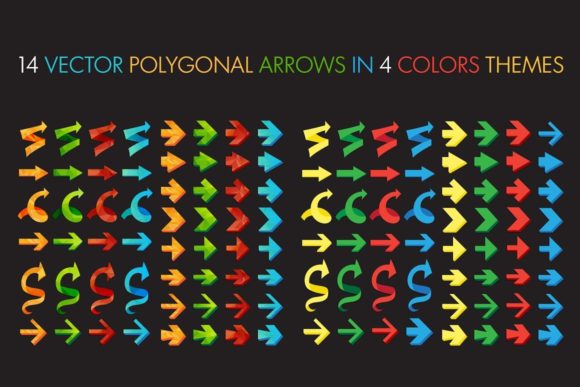
The Polygonal Arrows Set is a versatile collection of 14 vector-based arrows designed with a modern, minimalist aesthetic. These arrows are ideal for a wide range of applications, from web design to infographics, diagrams, and decorative elements. Their simple yet strong design makes them an excellent choice for both beginners and experienced designers looking to enhance their projects with a touch of style and clarity.
What Are Polygonal Arrows?
Polygonal arrows are geometric designs that use polygons—shapes with straight sides—to create directional indicators. Unlike traditional arrow designs that may rely on curves or complex shapes, polygonal arrows focus on clean lines and structured forms. This simplicity allows them to stand out in any visual context while maintaining a professional and modern look.
The Polygonal Arrows Set includes a variety of styles, each crafted to convey direction clearly and effectively. Whether you're designing a website, creating a chart, or developing a presentation, these arrows can serve as powerful visual cues that guide the viewer's attention.
Key Features of the Polygonal Arrows Set
The Polygonal Arrows Set comes with several notable features that make it a valuable tool for designers:
- 14 Vector Arrows: The set includes 14 different arrow designs, each available in multiple color themes.
- 4 Color Themes: Users can choose from four distinct color schemes, allowing for easy integration into various design projects.
- Simple and Strong Design: The arrows are designed to be both visually appealing and functionally effective, making them suitable for a wide range of uses.
- Low Poly Style: The arrows feature a low poly aesthetic, which adds a contemporary flair to any design.
Practical Applications of Polygonal Arrows
The Polygonal Arrows Set is not just a collection of graphics—it’s a functional resource that can be used in numerous real-world scenarios. Here are some common applications:
- Web Design: Arrows can be used to indicate navigation, such as next or previous buttons, or to guide users through a website's layout.
- Infographics and Charts: In data visualization, arrows help illustrate trends, directions, and relationships between different pieces of information.
- Diagrams and Flowcharts: When creating technical diagrams, arrows can show the flow of processes, making complex ideas easier to understand.
- Decorative Elements: The stylish design of these arrows makes them perfect for adding visual interest to presentations, posters, or other creative projects.
- UI/UX Design: For user interface (UI) and user experience (UX) design, these arrows can serve as interactive elements like download/upload buttons or cursor indicators.
Why Choose the Polygonal Arrows Set?
There are many reasons why the Polygonal Arrows Set stands out among other design resources:
- High Quality: The arrows are created using vector graphics, ensuring they remain sharp and clear at any size.
- Easy to Edit: The set includes an EPS file and an AI file, which can be opened and edited using Adobe Illustrator 10 or higher.
- Time-Saving: Instead of designing arrows from scratch, users can quickly access and customize pre-made designs, saving valuable time during the creative process.
- Consistent Style: With four color themes and a unified design language, the set ensures a cohesive look across all projects.
Understanding the File Formats
The Polygonal Arrows Set includes three main files:
- EPS File: Encapsulated PostScript (EPS) is a widely used format for vector graphics. It allows for high-quality printing and is compatible with most graphic design software.
- AI File: Adobe Illustrator (AI) files are ideal for editing and customizing vector graphics. They provide full control over the design elements, making them perfect for advanced users.
- JPG Preview File: A JPEG preview file gives users a quick visual reference of the arrows before downloading or using them in a project.
These file formats ensure that the arrows can be easily integrated into various design workflows, whether for print, digital media, or web development.
How to Use the Polygonal Arrows Set
Using the Polygonal Arrows Set is straightforward. Here’s a step-by-step guide:
- Download the Files: Access the EPS, AI, and JPG files provided in the set.
- Open in Adobe Illustrator: Use Adobe Illustrator 10 or newer to open and edit the vector files.
- Customize the Arrows: Adjust colors, sizes, and other properties to match your design needs.
- Export for Your Project: Once satisfied with the design, export the arrows in the desired format for use in your project.
This flexibility allows users to adapt the arrows to fit their specific requirements, whether they’re working on a personal project or a professional assignment.
Common Misconceptions About Polygonal Arrows
While polygonal arrows are a popular design choice, there are a few misconceptions that users might have:
- Misconception: They Are Only for Modern Designs: While polygonal arrows are often associated with modern aesthetics, they can also be adapted to fit more traditional or minimalist styles.
- Misconception: They Are Difficult to Use: In reality, the Polygonal Arrows Set is designed to be user-friendly, with clear instructions and editable files that make customization easy.
- Misconception: They Lack Versatility: On the contrary, these arrows are highly versatile and can be used in a wide range of contexts, from digital interfaces to printed materials.
Conclusion
The Polygonal Arrows Set is a valuable resource for anyone looking to enhance their design work with clean, modern, and functional arrows. Whether you're a beginner exploring design tools or an experienced designer seeking efficient solutions, this set offers a practical and stylish option for a variety of applications. With its simple yet strong design, versatility, and ease of use, the Polygonal Arrows Set is a must-have for any creative professional.